Solve your Computer Problems:
A Blog of Useful Information

As we research computer problems, we find interesting articles about security, useful applications, website design and solving computer problems. We hope you find these tidbits useful.

Sunday, September 23, 2007

“OLD” virus infects “NEW” Vista

A consignment of laptops from German manufacturer Medion, sold through German and Danish branches of giant retail chain Aldi, have been found to be infected with the boot sector virus ‘Stoned.Angelina’, first seen as long ago as 1994 and last included on the official WildList in 2001. According to German sources, anywhere between 10,000 and 100,000 systems may be infected, but as the machines apparently ship without floppy drives the virus is unlikely to spread. The systems come pre-installed with Windows Vista and Bullguard anti-virus, which will warn of the ‘harmless’ infection on booting the machines, but is unable to remove it.

About Stoned.Angelina from Symantec

The boot virus code is one sector in length with the infectious code being stored at side 0, track 0, sector 1 and the original master boot record code being stored at side 0, track 0 sector 2. On floppy disks, Stoned.Angelina calculates the last sector of the root directory and uses this location to store a copy of the original DOS boot sector.

In addition to standard viral replication, Stoned.Angelina contains a block of code designed to stealth (by means of redirection) any reads to the physical location side 0, track 0 sector 1 on both floppy disks and hard disks.

Contained within the virus code body is the following encrypted text, which is never displayed on the screen: Greetings for ANGELINA!!!/by Garfield/Zielona Gora

Monday, September 17, 2007

System Cannot Access CD-Rom, CD-Recorder or DVD Devices

If you uninstalled and reinstalled Nero in XP, or did an upgrade from a previous OS to XP without uninstalling Nero first, this is a known error (for both Adaptec and Nero). There is a problem caused by an association created in the system registry between some Adaptec driver files and the CD file system drivers for Windows 2000/XP. If the Adaptec driver files are renamed or removed, then the system will loose access to any CD drive (CD ROM, CD recorder, or DVD)
IMPORTANT: The following contains information about editing the registry. Before you edit the registry, make sure you understand how to restore it if a problem occurs.
If Windows XP won't start you can restore the registry by rebooting while pressing the F8 Key. Select "Last Known Good Configuration". Or you can use "System Restore" from Start->Programs->Accessories->System Tools.


1. Uninstall all CD Burning software from the system.
Make sure you create a System Restore Point before you make changes to the registry.
2. Go to the RUN line and type in Regedt32 and press Enter.
3. Go to the following registry locations and delete the key values for UPPERFILTERS and LOWERFILTERS
(Do NOT delete the entire 4D36E965-E325-11CE-BBFC1-08002BE10318 key just right click the individual keys and select Delete)


HKEY_LOCAL_MACHINE\SYSTEM\ControlSet001\Control\Class\{4D36E965-E325-11CE-BBFC1-08002BE10318}


HKEY_LOCAL_MACHINE\SYSTEM\ControlSet002\Control\Class\{4D36E965-E325-11CE-BBFC1-08002BE10318}


HKEY_LOCAL_MACHINE\SYSTEM\CurrentControlSet\Control\Class\{4D36E965-E325-11CE-BFC1-08002BE10318}


4. Close out of Regedt32.exe and reboot the computer.
5. You should have access to your CDROM drives after reboot.
Make sure you create a System Restore Point before you make changes to the registry.

Labels: , ,

Continual Activation Requests

Recently I started getting prompts to activate Windows XP every time I turn my PC on . "This copy of windows must be activated with Microsoft before you can log on. Do you want to activate windows now?" coming up each time I turn the PC back on. I have activated over the internet now about 8 times and have also dialed the telephone number to access the codes - each time the activation is successful. I can then access but why do I have to keep doing it? I purchased this PC new from a manufacturer with XP as OEM.

Solution: Try the following and note, you may be prompted to activate again but this time it should preclude needing to do it again unless you reformat or change enough hardware to exceed the activation threshold:
  1. Go to start/run, and type regsvr32.exe regwizc.dll
  2. Click OK, then, regsvr32.exe licdll.dll and click OK.
If that doesn't work:
Try it again as follows and include the additional steps below:
  1. Go to start/run, and type regsvr32.exe regwizc.dll
  2. Click OK, then,
  3. regsvr32.exe licdll.dll
  4. Edit the Value:
    HKEY_LOCAL_MACHINE\Software\Microsoft\WindowsNT\Cu rrent Version\WPAEvents "OOBETimer "
  5. Change at least one digit of this value to deactivate Windows.
  6. Restart windows:
  7. Start/Run, type:
    %systemroot%\system32\oobe\msoobe.exe /a
Answer provided by Michael Solomon MS-MVP

Tuesday, September 11, 2007

HP Printer Laserjet won't work with remote desktop

When you use Remote Desktop Connection or the Terminal Services Client version 4.0 or 5.0 to connect to another Windows-based computer from a computer that is not running Windows Server 2003, your local printers may not be redirected. As a result, your local printers are not available in the remote desktop or terminal services session. For example, if your Windows XP-based computer has a multifunction print device using a DOT4 port, it may not be redirected in a remote desktop session to a Windows 2000- or Windows Server 2003-based computer.

CAUSE

This problem occurs because the printer port does not begin with COM, LPT, or USB. By default, printer port names that do not begin with COM, LPT, or USB are only redirected in Windows Server 2003. By default, multifunction print devices may not be redirected unless you are running Windows Server 2003 on your local computer because they use DOT4 ports.

RESOLUTION

To resolve this problem on a computer that is not running Windows Server 2003, force all ports (including DOT4) on the client computer to be filtered for redirection. To do this, add a DWORD value named FilterQueueType to HKEY_CURRENT_USER\Software\Microsoft\Terminal Server Client\Default\AddIns\RDPDR and set its value data to FFFFFFFF.

Follow these steps, and then quit Registry Editor:
  1. Click Start, click Run, type regedit, and then click OK.
  2. Locate and then click the following key in the registry: HKEY_CURRENT_USER\Software\Microsoft\Terminal Server Client\Default\AddIns\RDPDR
  3. On the Edit menu, point to New, and then click DWORD Value.
  4. Type FilterQueueType, and then press ENTER.
  5. On the Edit menu, click Modify.
  6. Type FFFFFFFF, and then click OK.This enables all ports on the client to be redirected. To work around this problem on a client computer that has a multifunction print device, change the port that the multifunction print device uses from DOT4 to an LPT port.

For example, to configure a multifunction print device to use an LPT port on a Windows XP-based computer, follow these steps:

  1. InControl Panel, openPrinters and Faxes.
  2. Right-click the local printer that is not redirected, and then click Properties.
  3. Click the Ports tab, click an LPT port, and then click Apply.The printer should now appear next to that port.
  4. Close the Printer Properties window, and then reconnect by using Remote Desktop.Important When a multifunction printer is using a standard LPT port instead of the DOT4 port, it loses its multifunction capabilities, such as scanning, faxing, or copying. To regain the multifunction capabilities, the print device must use the DOT4 port.

STATUS
This behavior is by design.

Labels: , , , ,

Thursday, September 06, 2007

Free Anti Spam tool for your website

You put up your address on your website so prospects can contact you and now you're getting spam . You can take off your email but then how do they contact you? Syronex has a free solution. Go to http://w2.syronex.com/jmr/safemailto/. Put in your email address and they will give you the javascript you need to put on your page for the link to open your prospects email program with the subject you determine. They even have a free captcha script. (Completely Automated Public Turing Test to tell Computers and Humans Apart, is a challenge-response system test designed to differentiate humans from automated programs.)

Wednesday, September 05, 2007

33 Days To Online Profits Case Study

33 Days To Online Profits Case Study By: Jim Edwards & Yanik Silver Case study shows how they made $33,566 in 2½ weeks! Explores '33 Days to Online Profits' & the CD-ROM videos. This eBook comes in Adobe (.pdf format)

Labels: ,

Monday, September 03, 2007

Shield yourself from the looks of people around you when you are surfing the Web.

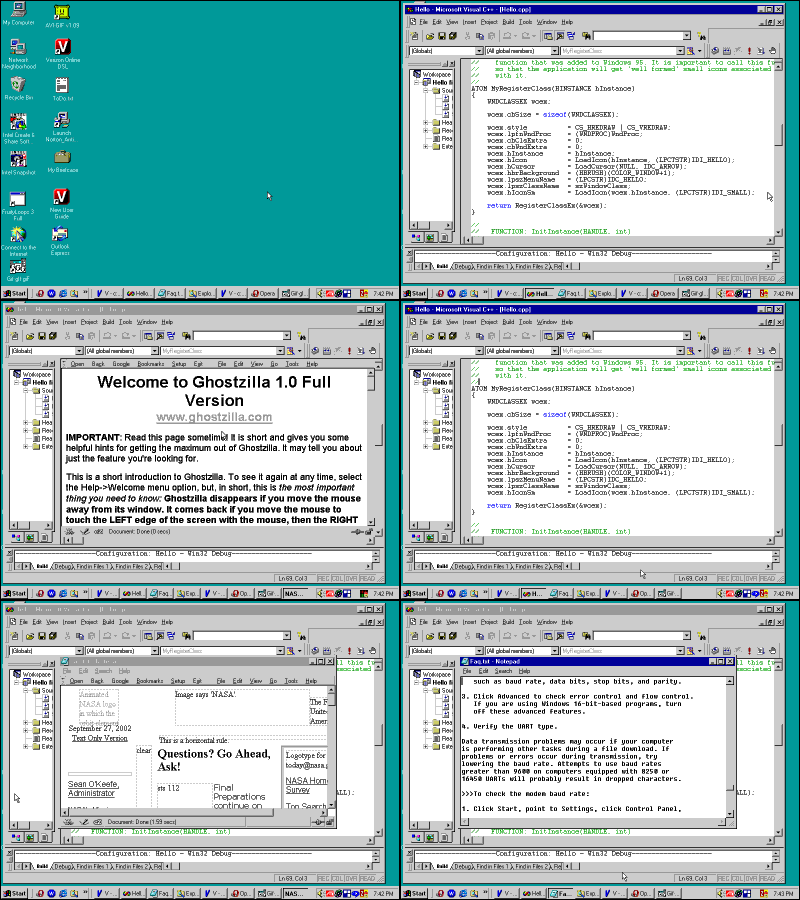
Ghostzilla Browser description: Shield yourself from the looks of people around you, when they try to see if you are surfing the Web

Ghostzilla browser for Windows is a tool that shields you from the looks of people around you, when they try to see if you are surfing the Web. With Ghostzilla, they see your normal work screen. You see the Web page, drawn to appear inside your work application and to look like that application to a bystander. If someone comes too close, move the mouse away from the Web page and it disappears, leaving the original application frame. When the coast clears, another mouse move brings Ghostzilla and the Web page back inside your application. The browser always has only one window, framed in your work application, but you can surf multiple pages at once in different tabs. Needless to say, popup ads can't exist. You are not even bothered by the in-page ads -- any non-tiny image is hidden unless you hover the mouse over its frame. It uses a clever approach that completely integrates the browser interface into virtually any application interface as well as Windows Explorer. In addition, it changes the web page colors and appearance to a discreet black and white document style that nicely blends with most business type documents. Even if your boss was standing right behind you, he would probably never suspect, that what you re looking at is a live web page. To further disguise the web page, all large pictures are initially hidden and only shown when you hold your mouse over each. The Ghostzilla browser uses the Mozilla browsing engine and supports all the web standards. The browser interface can be called via a secret mouse movement and instantly hidden when your mouse changes focus. A true must-have app for any surfing addict! Features: · adapts to all applications · full Web standards support · multi-page (tabbed) browsing · disabled pop-up windows · built-in Google search · text zoom in/out · runs directly from CD, without installation · does not write to Windows registry · does not leave files on your PC · keeps setting and history hidden and encrypted, or on a floppy · not shown in taskbar when hidden · six levels of camouflage

Saturday, September 01, 2007

Google earth come with a flight simulator!

Flight Simulator Keyboard Controls

This document describes the various keyboard combinations that you can use with the flight simulator features of Google Earth. To enter the flight simulator mode, press Ctrl + Alt + A (Command/Open Apple Key + Option + A on the Mac). Once you have entered flight simulator mode for the first time, you can re-enter the mode by choosing Tools > Enter Flight Simulator. To leave flight simulator mode, click Exit Flight Simulator in the top right corner or press Ctrl + Alt + A (Command/Open Apple Key+ Option + A on the Mac).

The following keystrokes control navigation and other aspects of the flight simulator. You can also control the aircraft with a mouse or joystick. To disable or enable mouse controls, left click (single click on a Mac). Once mouse controls are active, the pointer shape changes to a cross on your screen.

Note - Note that until you enter flight simulator mode, the following commands do not work.
spacer Command Windows/Linux Keystroke(s) Mac Keystroke(s) Result or Comment
Exit flight simulator Ctrl + Alt + A, Escape Command/Open Apple Key+ Option + A, Escape Exits flight simulator mode.
Open flight simulator options Ctrl + Alt + A Command/Open Apple Key + Option + A Opens the flight simulator dialog box.
Rotate pilot viewpoint Arrow keys + Alt (slow) or Ctrl (fast) Arrow keys + Alt (slow) or Ctrl (fast) Moves the viewpoint in the direction of the arrow.
Display flight simulator help Ctrl + H - Opens this flight simulator keyboard commands page.
Increase thrust Page Up Page Up -
Reduce thrust Page Down Page Down -
Aileron left Left arrow Left arrow -
Aileron right Right arrow Right arrow -
Elevator push Up arrow Up arrow -
Elevator pull Down arrow Down arrow down -
Rudder left Insert Shift + left arrow -
Rudder right Enter (numeric keypad) Enter (numeric keypad) -
Rudder left Shift + left arrow Shift + left arrow -
Rudder right Shift + right arrow Shift + right arrow -
Elevator trim nose down Home Home -
Elevator trim nose up End End -
Elevator trim nose down Shift + up arrow Shift + up arrow -
Elevator trim nose up Shift + down arrow Shift + down arrow -
Reduce flap setting Left bracket Left bracket -
Increase flap setting Right bracket Right bracket -
Reduce flap setting Shift + F Shift + F -
Increase flap setting F F -
Center aileron and rudder 5 5 -
Center aileron and rudder C C -
Extend/retract landing gear G G Only works if landing gear is retractable on current aircraft
Left wheel brake , (comma) , (comma) -
Right wheel brake . (period) . (period) -
Pause simulation Space Space -
Toggle HUD H H -